
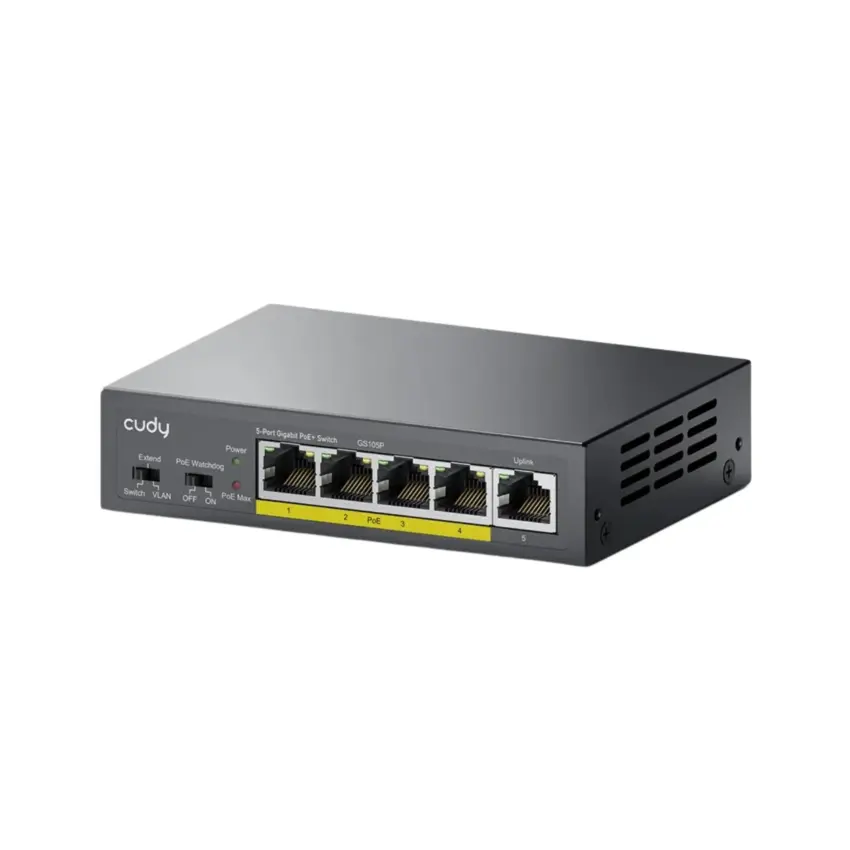
The Cudy GS105P 5-Port Gigabit PoE+ Switch makes it easier to build a reliable wired network by delivering both power and data through a single Ethernet cable.
With four PoE+ ports and one dedicated Gigabit uplink, you can connect compatible IP cameras, wireless access points, VoIP phones and other network devices without needing separate power sockets at each location.
Its compact metal housing, silent operation and plug-and-play design make it a practical choice for homes, offices, CCTV installations and small business networks.
For installations requiring longer cable runs, Extend mode increases transmission distance to up to 250 metres at 10Mbps, while VLAN mode isolates connected devices to improve network security.
The built-in PoE Watchdog can also automatically restart unresponsive devices, helping reduce the need for manual intervention.
With an included 36W power supply, intelligent power management and flexible desktop or wall-mounted installation, the GS105P offers a straightforward way to expand your network.
Product features
- 5 Gigabit Ethernet ports including 4 PoE+ ports and 1 dedicated uplink.
- 32W shared PoE power budget with up to 30W available on an individual port.
- IEEE 802.3af/at support for compatible PoE and PoE+ devices.
- 250m Extend mode for longer-distance connections at 10Mbps.
- VLAN isolation mode prevents direct communication between connected downlink devices.
- PoE Watchdog automatically restarts unresponsive devices when enabled.
- Intelligent power management helps prevent PoE power overload.
- 10Gbps switching capacity for efficient Gigabit Ethernet networking.
- Silent metal housing with desktop and wall-mounting options.
- Plug-and-play installation with an included 36W power adapter.
Where to use the Cudy GS105P PoE+ Switch
| Application | Typical uses |
|---|---|
| CCTV and IP surveillance |
Connect and power compatible PoE security cameras using a single Ethernet cable per camera. Extend mode supports longer cable runs, while PoE Watchdog helps recover unresponsive devices. |
| Wireless access points |
Supply network connectivity and power to compatible PoE Wi-Fi access points in homes, offices and commercial buildings. Ideal for expanding wireless coverage without installing separate power sockets near each access point. |
| Small office networks |
Expand wired Gigabit connectivity for compatible network equipment and everyday business devices. VLAN isolation helps separate connected client devices from one another. |
| VoIP telephone systems |
Connect and power compatible PoE desk phones in reception areas, offices and other workplace environments. |
| Digital signage and access control |
Provide network connectivity and PoE power to compatible signage controllers, access points and networked entry equipment. The compact housing allows installation in suitable network cabinets and distribution boxes. |
Technical specifications
- Brand: Cudy
- Model: GS105P 1.0
- Product type: Gigabit PoE+ Ethernet Switch
- Ethernet ports: 5 x 10/100/1000Mbps RJ45
- PoE+ ports: 4 (Ports 1-4)
- Uplink ports: 1 Gigabit RJ45
- PoE standards: IEEE 802.3af/at, Mode A
- Maximum PoE per port: 30W
- Total PoE budget: 32W
- Included power supply: 36W, 54V DC
- Operating modes: Default, VLAN, Extend
- Maximum standard cable distance: 100m
- Extend mode distance: Up to 250m at 10Mbps
- Switching capacity: 10Gbps
- Packet forwarding rate: 7.44Mpps
- MAC address table: 2K entries
- Jumbo frames: Up to 15KB
- Surge protection: Up to 4kV common mode
- Casing: Metal
- Cooling: Silent
- Installation: Desktop or wall-mounted
- Dimensions: 119 x 85 x 28mm
- Product weight: 253.6g
- Operating temperature: 0°C to 40°C
- Certifications: CE, FCC, RoHS
What's included
- Cudy GS105P 5-Port Gigabit PoE+ Switch
- 36W power adapter
- Power cable
- Wall-mounting kit
- Installation guide
Product documents
Frequently asked questions
Can the Cudy GS105P deliver 30W to all four PoE ports simultaneously?
No. Each PoE+ port supports up to 30W individually, but the switch has a combined PoE power budget of 32W.
The total power requirements of all connected PoE devices must remain within this shared limit.
Can I connect devices that do not support PoE?
Yes. The Ethernet ports can also provide network data connections to standard non-PoE devices.
Compatible PoE devices receive power through the Ethernet cable, while non-PoE devices use the connection for data only.
Does the 250m Extend mode support Gigabit speeds?
No. Extend mode increases the maximum transmission distance to 250 metres by reducing the connection speed to 10Mbps.
For Gigabit speeds of up to 1000Mbps, use suitable Ethernet cabling within the standard 100-metre distance limit.
What does VLAN mode do on the GS105P?
VLAN mode isolates the four downlink ports from one another, preventing devices connected to these ports from communicating directly.
Connected devices can still communicate with equipment through the uplink port.
This is particularly useful for keeping individual CCTV cameras or other network clients separated.
How does the PoE Watchdog function work?
When enabled in a supported operating mode, PoE Watchdog monitors connected devices and attempts to restart the relevant PoE port if a device stops transmitting data for five minutes.
This can help restore unresponsive IP cameras and access points without a manual power reset.
Cudy advises against enabling this function for devices that perform automatic online firmware updates.
What happens if the connected devices exceed the PoE power budget?
The GS105P uses intelligent power management to help prevent overload.
If the combined power demand exceeds the available budget, the switch automatically disconnects power to the most recently powered device.
Check the power requirements of each connected device before installation to avoid unexpected interruptions.